![Website+Logo+2.png]](https://help.docpace.com/hs-fs/hubfs/Docpace_April2024/images/Website+Logo+2.png?width=200&height=40&name=Website+Logo+2.png)
Appointment Stages
Appointments appear in one of three stages on the dashboard:
- Pending – Scheduled but not yet started.
- Active – Patient has checked in and is in progress.
- Done – Appointment is complete and in the checkout process.
Pending:
At the start of each day, all scheduled appointments display as Pending until:
- The patient checks in, or
- The appointment is marked Cancelled, Rescheduled, No-Show, or Auto-Paused.
.png?width=688&height=344&name=Knowledge%20Base%20Images%20(600%20x%20300%20px).png)
Possible Pending Appointment Details:
- Scheduled: Appointment start time from athenahealth.
- Delay: Predicted delay (black or red number) under the scheduled time.
- Predicted to Start: Time the patient is expected to be roomed, based on the DOCPACE® Patented Appointment Stacking Algorithm (scheduled time + predicted delay, if Suggested Arrival Time: Initial arrival time sent to the patient via DOCPACE® Engage/Digital Reception Link. (Can optionally adjust based on updated delays.)
- No-Show / Same-Day Cancellation Icon: Triggered based on your configuration thresholds.
- Confirmation Status: Current status from athenaCommunicator.
Some details only appear for providers using DOCPACE® Engage, while others are configurable in the Configuration settings.
Active:
Active appointments show the patient’s current Encounter State once they have checked in. DOCPACE® updates this data every 60 seconds via your athenahealth connection.
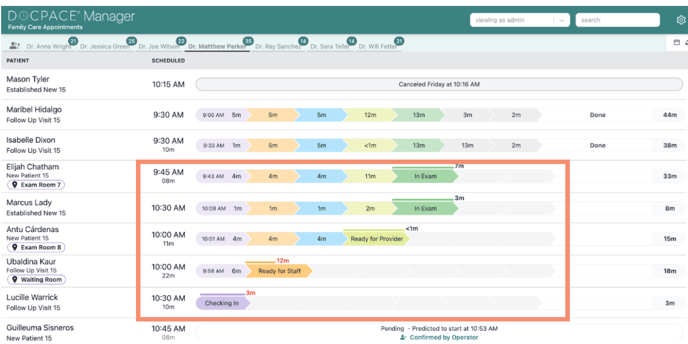
Standard Five Encounter Stages:
- CHECKING IN – Patient arrival and paperwork.
- READY FOR STAFF – Waiting room (Wait for Intake).
- INTAKE – In exam room with nurse, medical assistant, or PA.
- READY FOR PROVIDER – Empty exam room awaiting provider.
- IN EXAM – With provider for their appointment.
Note: DOCPACE® also tracks checkout stages, but these do not impact real-time tracking or prediction models. Need more help? If encounter states aren’t updating as expected, see the athenahealth Timestamps Knowledge Base article or contact your Customer Success Manager for a workflow review.
Done:
An appointment is marked Done when DOCPACE® receives an “Encounter Status Done” from athenahealth. This indicates the exam is over and the patient is in checkout—but it does not mean the encounter has been closed.
.png?width=688&height=344&name=Article%20-%20Understanding%20your%20Appt%20Dashboard%20-%20Active%20(2).png)
Appointments in the Done stage, or in any checkout stage, do not affect DOCPACE®’s real-time tracking or predictions.
Note: An appointment can appear as “Ready for Checkout” in DOCPACE® even if it is still marked “In Exam” in athenahealth. For details, see the Timestamps with athenahealth Knowledge Base page.
Want more accurate tracking of exam time? DOCPACE® can stop tracking exam duration even if the encounter remains open in athenahealth. Contact your Customer Success Manager to schedule workflow training.