![Website+Logo+2.png]](https://help.docpace.com/hs-fs/hubfs/Docpace_April2024/images/Website+Logo+2.png?width=200&height=40&name=Website+Logo+2.png)
Required Information for Account Creation
To create your DOCPACE® account, please provide the following to your DOCPACE® Customer Success Manager or email help@docpace.com:
- First & Last Name
- Email Address associated with your athenahealth User Profile
- List of Providers and Departments to display on your DOCPACE® Manager
Important: DOCPACE® works within the athenaone clinical workflow only if the email in your athenahealth user profile is provided.
To verify your email in athenahealth:
- Click the Gear Icon
- Select User Profile
- Confirm the email listed
Adjusting Providers & Appointments
You can update the Providers and Appointment Types displayed on your DOCPACE® Manager at any time by:
- Contacting your DOCPACE® Customer Success Manager
- Emailing help@docpace.com
- Using the Contact Support feature on your DOCPACE® Manager’s Configure Page
DOCPACE® can configure your Manager’s display based on:
- Department
- Provider
- Appointment Type
Note: Providers must be included in your subscription to appear on your account. To add a new provider, contact your DOCPACE® Customer Success Manager.
DOCPACE® + athenahealth Single Sign-On Setup
To access DOCPACE® via the athenaone embedded apps feature:
Requirements:
- Your DOCPACE® email matches your athenahealth User Profile email
- Embedded Apps feature is enabled for your account
For athenahealth Super Users:
- Click Gear Icon → Practice Manager → Embedded App User Subscriptions
- Choose Subscribe All Users OR Add Subscriber for individual access
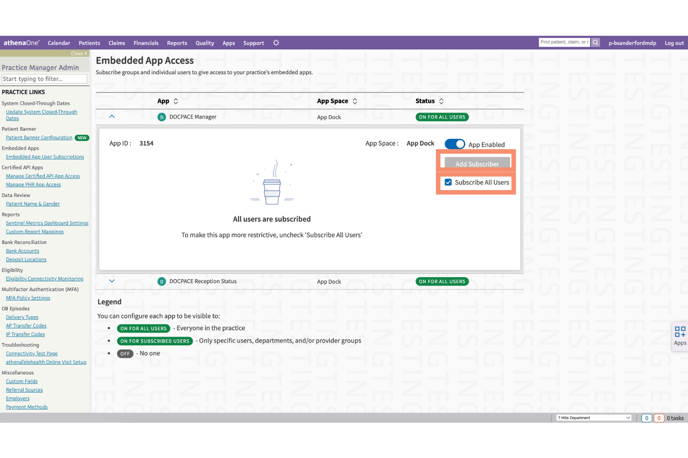
Note: If “Subscribe All Users” is selected, DOCPACE® will display for all staff, but will only open for users with a DOCPACE® account.
DOCPACE® Practice URL (Optional)
If you need access outside the athenaone workflow (e.g., on a smart TV or tablet), request a Practice URL:
Example: yourpractice.docpace.live
To request:
Contact your DOCPACE® Customer Success Manager
Email help@docpace.com
Use Contact Support in your DOCPACE® Manager
Once created, your Customer Success Manager will email activation steps.
Note: Practice URLs are not part of athenahealth SSO and require you to create your own password.
Inviting Additional Team Members
To add new users, contact your DOCPACE® Customer Success Manager, email help@docpace.com, or use Contact Support in your DOCPACE® Manager.
Provide:
First & Last Name
Email associated with their athenahealth User Profile
List of Providers and Departments to display on their DOCPACE® Manager
Note: If “Subscribe All Users” is NOT enabled, an athenahealth Super User must also add the new user as a DOCPACE® Subscriber.