![Website+Logo+2.png]](https://help.docpace.com/hs-fs/hubfs/Docpace_April2024/images/Website+Logo+2.png?width=200&height=40&name=Website+Logo+2.png)
DOCPACE® Manager offers two ways to sort your appointments:
-
DOCPACE Queue (default)
-
Scheduled Start
You can switch between these options using the dropdown on the Configure page.
DOCPACE Queue (Default)
This view uses the DOCPACE® patented Appointment Stacking Algorithm to organize your schedule in real time—prioritizing provider and exam room availability.
Best for: Front Office and Clinical Staff.
-
Groups patients by their current Appointment Encounter State (e.g., “In Exam,” “Ready for Provider,” “Ready for Staff”).
-
Orders patients by progress in their encounter, not their scheduled start time. For example, all “In Exam” patients appear before those “Ready for Staff.”
-
Moves canceled, rescheduled, no-show, and force-paused appointments to the top of the page.
-
Automatically adjusts the schedule to account for provider availability, delays, and disruptions.
Example: Typical day on the dashboard:
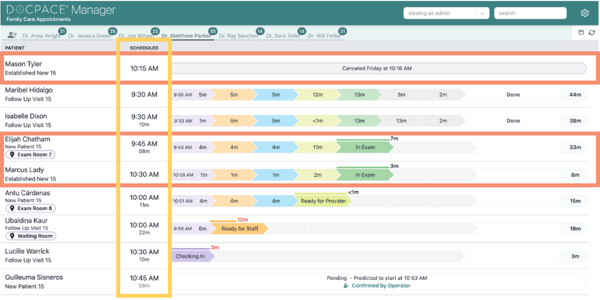
The above image highlights key features of the DOCPACE® Queue:
- Appointments are not displayed in chronological order by scheduled start time.
- The 10:15 AM canceled appointment has been removed from the active queue.
- Both patients In Exam are grouped together at the top.
- Patients are sorted by encounter state:
-
- In Exam
-
- Ready for Provider
-
- Ready for Staff
-
- Checking In
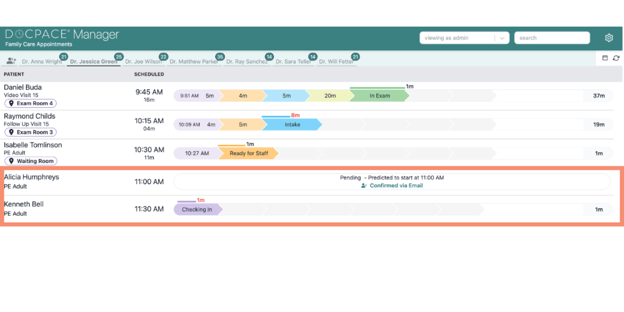
Example Above: If a patient arrives early for an 11:30 AM appointment but the 11:00 AM patient hasn’t arrived yet, the early arrival will stay out of the queue until it makes sense to room them
Scheduled Start
This view displays appointments in the same chronological order as athenahealth.
Best for: Scheduling Staff.
-
Sorts strictly by scheduled start time.
-
If canceled appointments are set to display in your configuration, they remain in place instead of being moved.

Tip: Both sorting options work with combined schedule views, but the order may vary depending on your Group Appointments by Provider configuration.