![Website+Logo+2.png]](https://help.docpace.com/hs-fs/hubfs/Docpace_April2024/images/Website+Logo+2.png?width=200&height=40&name=Website+Logo+2.png)
Your DOCPACE® Manager is divided into three main sections:
Appointment Dashboard.png?width=688&height=344&name=Article%20How%20to%20Sort%20Appointments%20Image%201%20(1).png)
.png?width=688&height=344&name=openside%20analytics%20(2).png)
Each section is designed to give you real-time control over schedules, access to actionable data, and tools to customize your experience. More details on each can be found in their respective Knowledge Base guides.
Tip: Your DOCPACE® Manager is built to help you work smarter. From adjusting appointment flows in real time to analyzing long-term patient trends, each section helps your team reduce delays, improve efficiency, and boost patient satisfaction.
Provider Permissions
The providers you see in your Appointment Dashboard and Analytics are based on your DOCPACE® account permissions. These can be updated at any time by:
- Contacting your DOCPACE® Customer Success Manager
- Emailing help@docpace.com
- Using the Contact Support feature on the Configure Page
Appointment Dashboard
The Appointment Dashboard is your landing page when logging into DOCPACE®. It provides a live view of your enabled schedules and appointments, with real-time updates, alerts, and predictions for the current day’s schedule.
- By default, the first provider shown is determined alphabetically.
- You can switch views to another provider or view multiple schedules at once.
Tip: Real-time visibility into patient flow and provider schedules helps front desk and clinical teams proactively adjust for delays, minimize bottlenecks, and keep the day running on time.
Analytics Sidebar
The Analytics Sidebar gives you access to various data and performance reports. Selecting a report changes your view from the Appointment Dashboard to the selected data set.
Available Reports (permission-based):
- Monthly Report
- DOCPACE® Insights
- Practice Overview
- Workflow Quality
- Growth Analytics
- Appointment Durations
- Working Hours
- Patient Behavior
- Template View
- Patient Flow Report®
Tip: Reports surface trends in provider efficiency, patient behavior, appointment cycle times, and bottlenecks—equipping your team with the insights to continuously improve scheduling and patient flow.
Note: Not all reports are available to every user. To request additional report access, contact your DOCPACE® Customer Success Manager, email help@docpace.com, or use the Contact Support feature on the Configure Page.
Configure Page
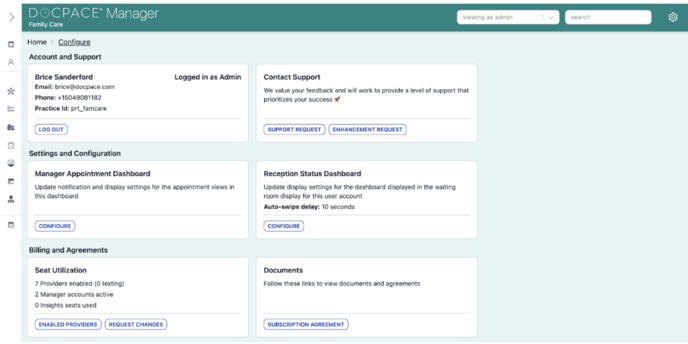
The Configure Page houses account settings, support tools, and customization options for your Appointment Dashboard.
Accessing the Configure Page:
Click the Gear Icon (⚙️) in the top-right corner of DOCPACE® Manager.
Tip: Customizing your views and settings ensures DOCPACE® reflects your practice’s specific needs—resulting in better workflows and more accurate reporting.
Configure Page Sections:
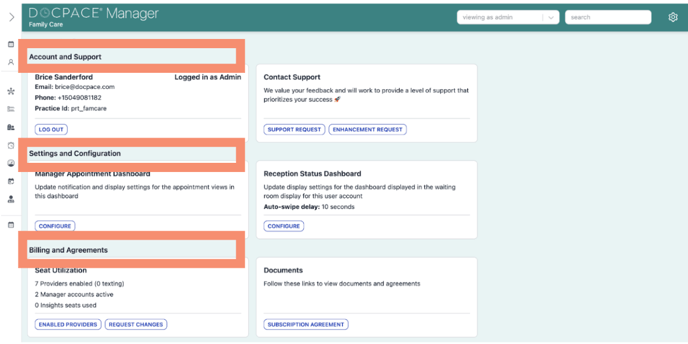
- Account & Support
- View account details
- Send support or enhancement requests
- Settings & Configuration
- Customize Appointment Dashboard view
- Adjust Reception Status Dashboard settings
- Billing & Agreements (Admin only)
- Seat utilization
- Enabled providers
- Request subscription changes
- View subscription agreements
Note: Only Admin accounts have access to the Billing & Agreements section.