![Website+Logo+2.png]](https://help.docpace.com/hs-fs/hubfs/Docpace_April2024/images/Website+Logo+2.png?width=200&height=40&name=Website+Logo+2.png)
Real-Time Updates & Predictions
DOCPACE® receives updates from your athenahealth instance through a live API connection. In most cases, this occurs every 60 seconds. Each update automatically refreshes your DOCPACE® Manager with the latest information since the last sync.
These updates may include:
- Real-Time Tracking of patient flow.
- Time spent in each encounter stage.
- Changes to appointment start times.
- Visits added, removed, or moved to another schedule.
- Popups and alerts.
- DOCPACE® Engage details (if enabled).
Real-Time Tracking
A unique DOCPACE® feature is real-time patient flow tracking.
.png?width=688&height=344&name=Article%20-%20Understanding%20your%20Appt%20Dashboard%20-%20Active%20(1).png)
DOCPACE® considers an appointment “started” when the patient is no longer in the waiting room—typically at the With Staff / Intake stage or beyond. By this point, the patient is occupying two limited resources that most affect flow:
- An exam room.
- A provider’s time.
Key factors in DOCPACE®’s patented Appointment Stacking Algorithm:
- Average duration of each encounter stage for a provider and appointment type.
- Real-time tracking of each stage during the encounter.
- Limited resource tracking (room occupancy + provider availability).
Tip: Instead of viewing your day as a stack of static appointments, DOCPACE® treats it like a game of Tetris—shaping predictions based on both scheduled times and actual in-progress durations.
Tracking Time in Encounter States
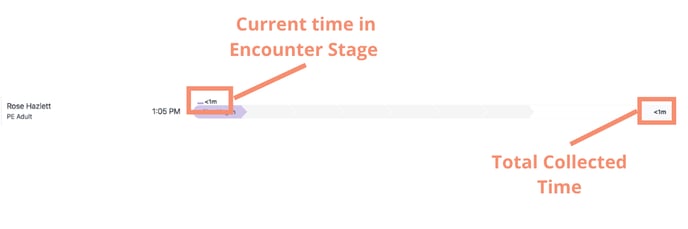
- A patient becomes “active” on your Manager as soon as they start check-in.
- DOCPACE® tracks time in each stage until the patient moves to the next stage.
- The current stage duration appears above the stage icon in the appointment row.
- Once the stage ends, the full time is displayed in the filled stage icon.
- If a patient exceeds their average stage time, the number will highlight in red.
Averages are provider-specific and can vary by appointment type and department.
Hover over a stage to see its start time and the provider’s average for that appointment type.
.png?width=688&height=344&name=Article%20-%20Understanding%20your%20Appt%20Dashboard%20-%20Hover%20tool%20tip%20(1).png)
For details on how these times are captured, see the athenahealth Timestamps Knowledge Base article.
Appointment Start Time Predictions
Real-time tracking enables DOCPACE® to predict—and continually update—future appointment start times.
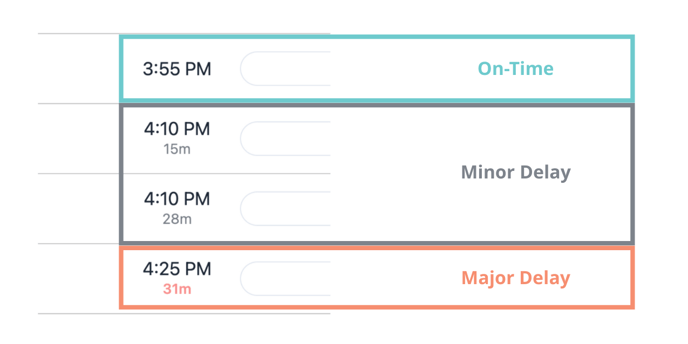
In the Scheduled column:
- No Number: On-time start.
- Gray/Black Number: Minor delay.
- Red Number: Major delay.
Definition: A Major Delay is 30 minutes or more past the scheduled start time (estimated or actual).
Predictions change from estimated to realized delays once a patient reaches With Staff / Intake or beyond.
Schedule Changes
DOCPACE® refreshes schedules every 60 seconds for enabled providers:
- Added Visit: Appears in the queue with its scheduled time.
- Removed Visit: Shows per your configuration, with cancellation reason.
- Moved Visit: Appears on the new provider’s schedule and is removed from the original.
Note: Both provider schedules must be DOCPACE®-enabled to track patient movement between them. For dynamic schedules (e.g., rendering provider or walk-in schedules), DOCPACE® can be configured to track delays accurately as appointments shift. Contact your CSM for setup.
Popups & Alerts
Popups and alerts triggered by these real-time updates are explained in detail in the Alerts, Icons and Notifications Knowledge Base article.
DOCPACE® Engage Details
- If you use DOCPACE® Engage, the Pending Patient appointment row will also display:
- Predicted Start Time
- Suggested Arrival Time
.png?width=688&height=229&name=Article%20-%20Suggested%20arrivalPredicted%20arrival%20etc%20(1).png)
Hover over the "Scheduled" column to see:
- Estimated start time.
- Suggested arrival time.
- Time the first DOCPACE® Engage message was sent.
Note: A Suggested Arrival Time does not simply equal the delay. For example, if a patient’s estimated start is 9 minutes late, the Suggested Arrival might be 4 minutes late—factoring in check-in time and resource availability.