![Website+Logo+2.png]](https://help.docpace.com/hs-fs/hubfs/Docpace_April2024/images/Website+Logo+2.png?width=200&height=40&name=Website+Logo+2.png)
Your DOCPACE® subscription is billed monthly based on a seat utilization model, meaning your cost is determined by the number of enabled providers. You can view all of your enabled providers and configurations via the Configure Page.
If you need Admin permissions, contact your DOCPACE® Customer Success Manager, email help@docpace.com, or use the Contact Support feature in your Configure Page.
Seat Utilization Overview
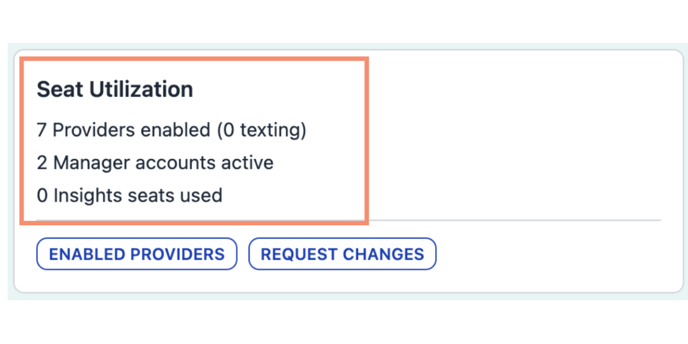
Located in the Billing & Agreements section of the Admin view, the Seat Utilization panel displays:
- Total enabled providers
- Feature utilization
- List of enabled providers
- Request Changes option
Seat and feature utilization categories include:
- Providers Enabled – Total number of providers active on DOCPACE®
- (texting) – Number of providers using DOCPACE® Engage
- Manager Accounts Active – Unique DOCPACE® Manager accounts in use
- Insights Seats Used – Accounts with DOCPACE® Insights access
Enabled Providers View
Selecting Enabled Providers opens a detailed view showing:
Display Name of each provider
NPI Number
Checkbox showing if the provider is using DOCPACE® Engage
Requesting Changes
Clicking Request Changes opens a message form that automatically includes your name and practice. This sends a ticket to both your DOCPACE® Customer Success Manager and Account Engineer.
Subscription Documents
The Documents section contains the most up-to-date DOCPACE® Subscription Agreement. You can review it anytime by clicking Subscription Agreement.
View the DOCPACE® Subscription Agreement