![Website+Logo+2.png]](https://help.docpace.com/hs-fs/hubfs/Docpace_April2024/images/Website+Logo+2.png?width=200&height=40&name=Website+Logo+2.png)
Alerts, Icons, and Notifications in DOCPACE® Manager
The Alerts, Icons, and Notifications in DOCPACE® Manager provide real-time schedule updates based on your Configuration Settings.
These updates pull from multiple points in the athenahealth clinical workflow, helping you save time and stay aware of the most important changes to your schedule.
For details on adjusting these settings, see the Configuring your Manager Dashboard Knowledge Base page.
Patient Flow Popups
- Purpose: Notify you when patients are experiencing appointment delays or are in a waiting state.
- Details:
- Displays the patient’s full name or initials, the duration trigger, and their scheduled provider.
- Three types of popups:
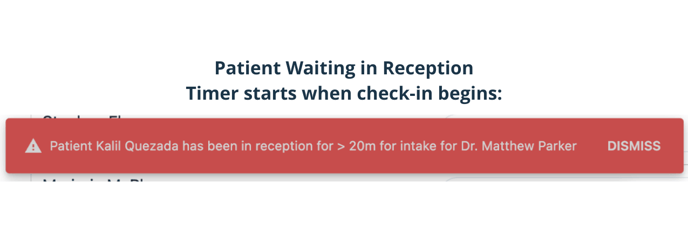
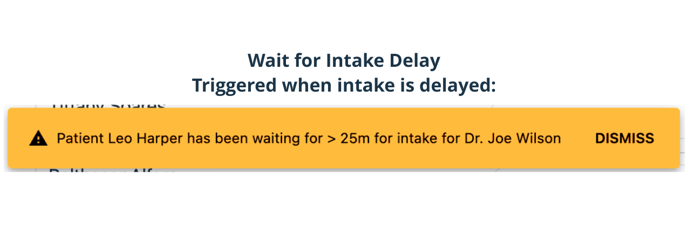
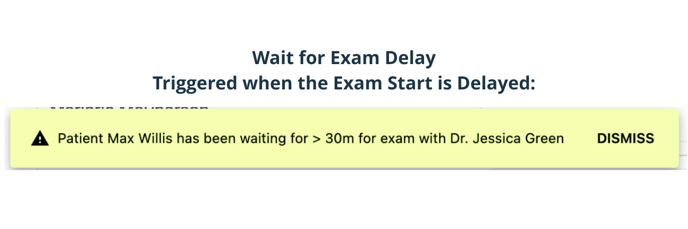
Tip: For delay alerts, enable Patient Waiting in Reception Popup and set Ignore Early Check-In to ON.
Flash Row
- Purpose: Visually highlight delayed appointments.
- Details:
- Colors the entire appointment row when the delay threshold is met.
- Patient Waiting in Reception – Flashes based on the reception delay timer.
- Wait for Intake – Flashes in orange.
- Wait for Exam – Flashes in yellow.
.png?width=688&height=229&name=Article%20-%20Alerts%20Intake%20(2).png)
Note: Enabling popups will also enable Flash Row.
No Show / Same Day Cancellation Icon
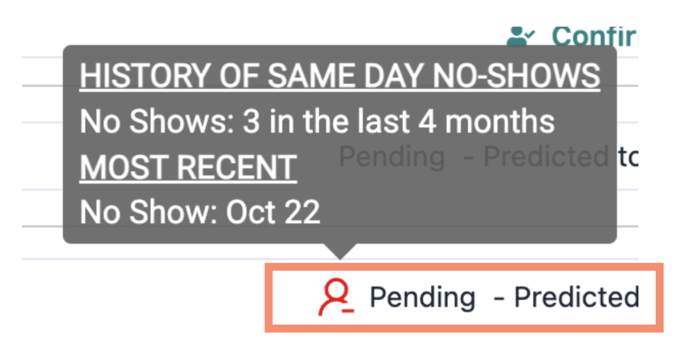
- Purpose: Identify patients with a history of missed appointments.
- Details:
- Icon appears if the patient has equal to or more than your set threshold of no-shows/cancellations in the past year.
- Hover over the icon to view:
- Total no-shows and cancellations in the past year.
- Date of the most recent missed appointment.
Tip: Use alongside Confirmation Status to anticipate last-minute openings.
Cancellation / Reschedule Alerts
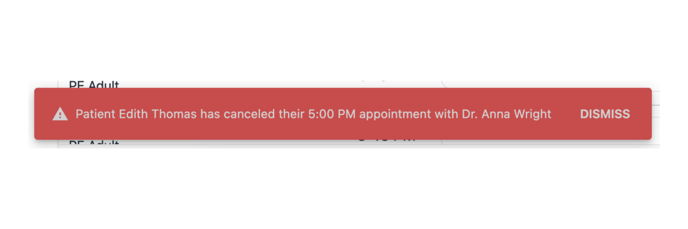
- Purpose: Notify you immediately when a patient cancels or reschedules for the same day.
- Details:
- Triggers within 60 seconds of the change.
- Popup includes patient name/initials, appointment time, and provider.
- Must be manually dismissed.
Cancelled / Rescheduled / No Show Appointments
.png?width=688&height=229&name=Article%20-%20Alerts%20Exam%20(1).png) Purpose: Easily identify appointment slots that recently opened.
Purpose: Easily identify appointment slots that recently opened.- Details:
- Appointment row displays a grey border and a reason label:
- Canceled
- Rescheduled
- No Show
Auto-Paused Appointments
.png?width=688&height=229&name=Article%20-%20Alerts%20Exam%20(3).png)
- Purpose: Keep schedule predictions accurate by removing inactive appointments.
- Details:
- Triggered when:
- Appointment is past the scheduled start time.
- Patient has not checked in.
- Appointment has not been cancelled/rescheduled.
- Appointment resumes in the queue if the patient checks in, or updates with the appropriate outcome.
- Triggered when:
Tip: Contact your Customer Success Manager to adjust auto-pause settings.
Patient Communication Icons
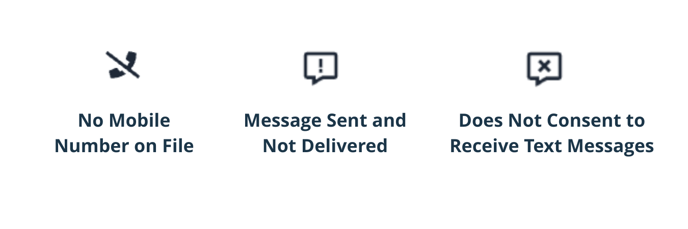
- Purpose: Flag patients who will not receive text messages.
- Icons:
- No Mobile Number on File
- Does Not Consent to Receive Text Messages
- Message Sent and Not Delivered – Only appears if DOCPACE® attempts and fails to send.
Tip: Text messaging is the #1 preferred communication method. Work with your Customer Success Manager for patient communication campaigns.
Patient Location
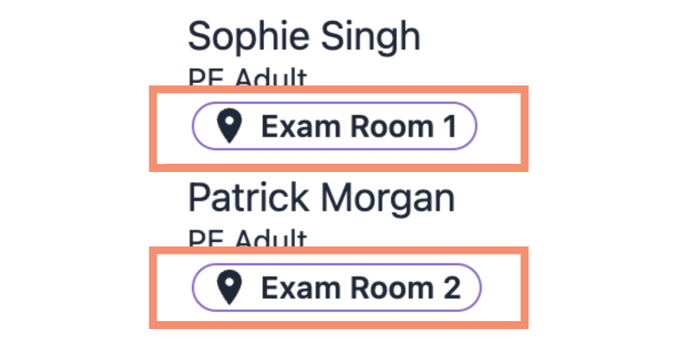
- Purpose: Display the patient’s current location.
- Details:
- Defaults to Waiting Room at check-in.
- Updates based on athenahealth encounter location changes.
- If the location is not updated, it remains as “Waiting Room.”
Confirmation Status
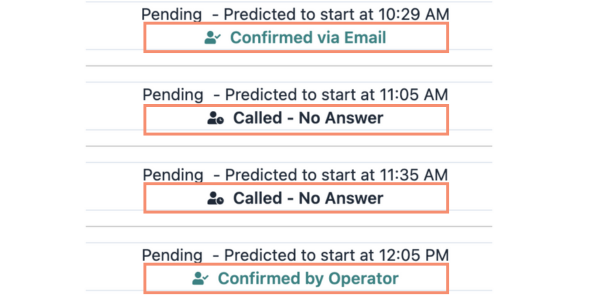
- Purpose: Show the most recent appointment confirmation status.
- Details:
- Color-coded:
- Green – Confirmed
- Black – Unconfirmed
- Status is pulled from athenaCommunicator.
- Color-coded:
Tip: Use Confirmation Status + Communication + No-Show indicators to plan outreach or adjust scheduling.
Patient Initials Only Mode
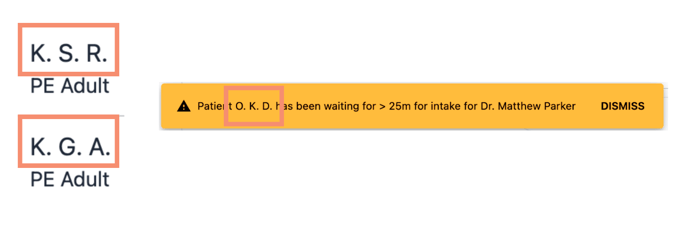
- Purpose: Enhance privacy in public viewing areas.
- Details: Displays patient initials instead of full names in appointment rows and popups.
Checked In via the App
- Purpose: Support contactless check-in using DOCPACE® Engage’s Car Check-In feature.
- Details:
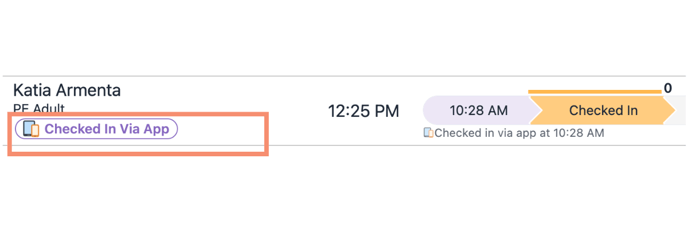
- Patient marks “Arrived” in Digital Reception → Status changes to Checking-In in athenahealth and DOCPACE®.
.png?width=688&height=229&name=Checked%20in%20Via%20App%20(2).png)
-
- “Ready” button appears in the appointment row → Click to send notification for the patient to come inside.
Note: Originally developed for COVID-19 safety, this feature can be customized for seasonal illness precautions.